
wp-Monalisa ist das WordPress Plugin, das dich anlächelt wie nur Mona Lisa es tut. 
wp-Monalisa ist ein weiteres Smiley-Plugin zur Einbindung beliebiger Smilies in Artikel, Seiten und Kommentare. Dabei soll wp-Monalisa leicht zu bedienen sein und sich in die WordPress-Oberfläche integrieren.
Auslöser für die Realisierung war Barbara, die mir immer wieder versicherte, die bestehenden Plugins seien umständlich zu handhaben, werden nicht mehr gepflegt oder unterstützen nur bestimmte Funktionalitäten zur Einbindung von Smilies auf dem heimischen Blog. So ist dann die Idee von wp-Monalisa geboren worden…es ist einfach, es lächelt, was will man mehr? 
Über Eure Anregungen und Hinweise freuen wir uns.
For some hints in english look at readme.txt
Features
- Verwaltung der Smilies in einem eigenen Verzeichnis über den Admin-Dialog
- Smilies können nur für Posts, nur für Kommentare oder für beides zugelassen werden
- Smilies können direkt durch img Tags ersetzt werden
- die WordPress Smiley Funktion kann ergänzt oder übersteuert werden
- wp-Monalisa zeigt sich im Edit-Dialog in einer praktischen, verschiebbaren und einklappbaren Metabox
- wp-Monalisa erweitert vorhandene Kommentarformulare um Smilies
- die Smilies können beim Kommentarformular auf- und zugeklappt werden.
- Importfunktion für phpbb Smiley-Pakete (beispielsweise zu finden unter www.greensmilies.de)
- Exportfunktion für phpbb Smiliey-Pakete (.pak Format)
- wp-Monalisa unterstützt sowohl GIF, als auch PNG Smilies
- Ab der Version 1.1. wird auch der FCK Editor unterstützt. Das Plugin dazu gibt es hier
- Ab der Version 1.2 besteht die Möglichkeit an den Icons Tooltips einzublenden.
- Ab der Version 1.3 unterstützt wp-monalisa rudimentär auch Multisite-Blogs
- Ab der Version 1.4 bietet wp-monalisa eine Funktion zum besseren Einbinden und Platzieren der Smilies im Kommentarformular (s. Abschnitt 6 im Handbuch oder die ausführliche Erklärung bei Stefan)
- Ab der Version 1.8 können die Kommentarsmilies pro Artikel an und ausgeschaltet werden.
- Ab der V1.8 bietet wp-monalisa auch eine Supportfunktion für Fragen und bei Problemen
- Ab der Version 2.1 bietet wp-monalisa vollständige Unterstützung für BuddyPress inkl. den bbPress Foren
- Ab der Version 2.0 ist wp-monalisa kompatible zum Plugin Codestyling Localization von Heiko Rabe
Die Version 2.4 beinhaltet einen Tabellenupdate, dass Plugin muss also bei manueller Installation einmal deaktiviert und wieder aktiviert werden.
Download
Ältere Versionen auf wordpress.org
Dokumentation
Das englischsprachige Readme. The readme.txt in english.
Die wunderbare Dokumentation von Barbara.
The wonderful manual from Barbara
Eine Kurzanleitung zur Integration von wp-monalisa in das dmsguestbook
Ausführliche Anleitung bei Stefan zur Positionierung der Smilies im Kommentarformular
WordPress Plugin wp-Monalisa Screencast zur Installation
WordPress Plugin wp-Monalisa Screencast zur Konfiguration
WordPress Plugin wp-Monalisa Screencast zur Verwendung
WordPress Plugin wp-Monalisa Screencast zum Im- und Export von Smilies
Rumänische Übersetzung des Plugins von Alexander Ovsov
Installation
- Auspacken des zip-Archivs und uploaden in das WordPress-Pluginverzeichnis (wp-content/plugins/), so daß wp-monalisa.php im Ordner wp-content/plugins/wp-monalisa/ landet.
- Aktivieren des plugins über den Plugin-Admindialog.
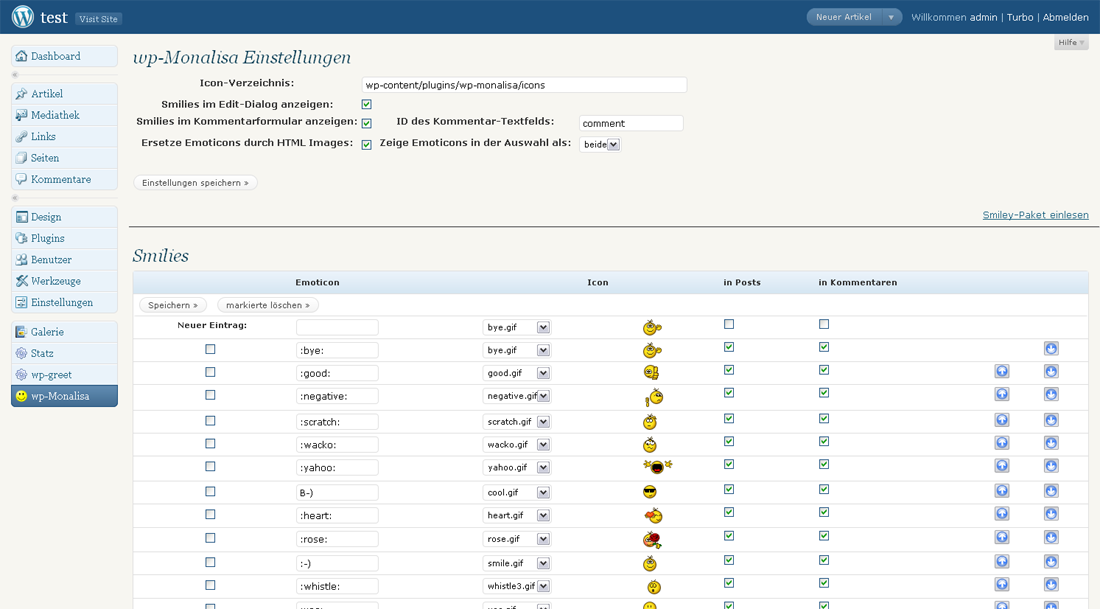
- Einstellungen auf der wp-Monalisa Admin-Seite vornehmen (auf jeden Fall, sollte die Kommentarfeld ID geprüft werden, besonders bei der Verwendung von eigenen nicht standardisierten Themes)
- Optional: Wer möchte kann die Anzeigestile in der Datei wp-monalisa.css anpassen.
Beim Update sollte das Plugin einmal deaktiviert und dann wieder aktiviert werden, da im Falle von Datenbankänderungen, dies nur dann durchgeführt werden. Die gepflegten Smilies werden dadurch nicht gelöscht. Wer Änderungen am Layout vornehmen möchte, sollte diese durch kopieren der wp-monalisa-default.css nach wp-monalisa.css und dann editieren der wp-monalisa.css vornehmen. Ab der Version 1.0 werden beim Autoupdate von WordPress sowohl die Datei wp-monalisa.css, als auch eventuell vorhandene eigene Smilies im Unterverzeichnis icons geschützt und nicht mehr durch den Autoupdate gelöscht. Dieses Feature greift erstmalig dann mit dem Update auf die Version 1.1 (mit 1.0 sind die entsprechenden Funktionen eingebaut worden).
Screenshots


Historie
2009-05-17 v0.1 Initial release
2009-05-22 v0.2 added alt attribute to img tags, to produce correct xhtml, fixed german translation, added import dialog to import phpbb3 smiley packages, added space after shortcode insertion, automatically extend array allowedtags when oncomment and replace options are set, improve error handling with directories, added polish translation
2009-05-29 v0.3 renamed default icons with prefix wpml_ to get a more or less unique name and prevent override, modified row width of row emoticon to 25, add maxlength attribute=25 to input fields for emoticons, added screenshot for import dialog, styled admin dialog a bit more wordpress like (alternate background color for table, buttons outside the table, added checkall box)
2009-05-30 v0.4 fixed trimming whitespace from emoticons in admin dialog, fixed replace algorithm, now search for longest substring first and can handle any whitespace situation
2009-06-16 v0.5 added dummy version to javascript includes to hide wordpress version, insert smilies with trailing space to make sure the shortcodes can be found, set default smiley to correct file name, now png icons are also supported, surpress showing smilies mor than once if more than one shortcode is defined for the same file, modified column width of column iconfile to 80
v0.6 (2009-08-18) changed readme to support new changelog feature at wordpress.org, new option, smilies can also be output in a table (only for comments), added support for user specific css file to improve support for automatic update, fixed handling of slashes in emoticons, fixed handling of trailing spaces in emoticons
v0.7 (2009-09-27) added russian translation, thanks to Fat Cow (http://www.blog.fatcow.com), added belorussian translation, thanks to ilyuha (http://antsar.info), added .pak export functionality, divided smiley-list into two pages (smiley list navigator using jquery ajax)
v0.8 (2009-11-30) fixed invalid XHTML in admin dialog, fixed strange behaviour when deactivating smilies on comments results in null, added hint to deactivate wordpress smilies fpr wp-monalisa
v0.9 (2009-12-19) fixed invalid xhtml in admin dialog, mark iconfiles not yet mapped with a star
v1.0 (2010-01-17) fixed wrong initial value for show as table option, added alt attribute to admin dialog icons (xhtml fix), set floating control div to display:none in wpml_comments.php, added support for autoupdate to prevent auto delete of private smilies and custom css, fixed undefined index warning in wpml_admin.php
v1.1 (2011-01-23) added support for fckeditor (thanks to Ivonne)
v1.2 (2011-03-13) fixed a problem with wp 3.1 in network mode, due to a different search path the wrong setup.php was included, added tooltip support for icons
v1.3 (2011-05-03) added simple support for multisite installtions (smilies can be only maintained from mainblog and work on every blog which it is activated for)
v1.4 (2011-08-08) added function get_wpml_comment() which returns the smiley-html-code to integrate within comment_form theme code
v1.5 (2011-10-22) removed russian translation because of a restricton from wordpress.org, added hebrew translation thanks to Sagive
v1.6 (2011-12-14) now using wp_enqueue_style for css, clean up html5 code errors for 3.3 compatibility
v1.7 (2011-12-21) clean up more (maybe all?) html5 code errors for 3.3 compatibility
v1.8 (2012-02-19) add new support and donation feature, add posibility to disable comments smilies on a single post/page, use standard load for wordpress includes
v1.9 (2012-03-05) fixed a typo with trailing spaces in emoticons, added default admin email to support form, added theme name to support form, work around a bug in bwp minify with jquery events
v2.0 (2012-06-10) extended multisite support for better handling
v2.1 (2012-08-05) swtiched to load_plugin_textdomain for compatibility, load js only when applicable, added support for BuddyPress (Acitivties, Messages, Notices, Groups, bbpress-Forums)
v2.2 (2012-09-28) fixed a warning which was generated during plugin activation
v2.3 (2012-10-01) added width and height attribute to img tags speeding up browser rendering if many smilies are used, added deferred loading for the hidden smilies if pulldown smilies are active, added „more…“ Smilies are inserted when „more…“ is clicked, removed an incompatibility with Better WP Minify
v2.4 (2012-10-21) with special configurations smilies disappeared due to lack of dimensions
v2.5 (2012-10-26) with special configurations smilies disappeared or where shown with wrong dimensions
v2.6 (2013-03-16) changed hint text to new WordPress labels, extendd support of use from within php, fixed bug with BuddyPress when using tables for output
v2.7 (2013-04-20) extended wpml to allow using  and :YES: as different emoticons, separate the support for bbPress and BuddyPress and support bbPress tinyMCE
v2.8 (2013-07-01) added support to integrate smilies into bp profile messaging ux free plugin
v2.9 (2013-07-01) fixed problems with smilies and BuddyPress profiles
v3.0 (2013-08-04) fixed some php warnings
Hallo,
Zunächst möchte ich Ihnen für Ihr kostenloses Plugin danken, mit dem wir Smileys in unseren Austausch auf bbpress einfügen können.
Seit gestern stellen wir jedoch folgendes Versagen fest:
Smiley-Icons sind immer gut sichtbar, aber wir können sie nicht mehr in unseren Nachrichten verwenden. Die „Klicks“ auf diese Symbole sind jetzt inaktiv.
Können Sie uns helfen?
Vielen Dank. Vielen Dank.
Mit freundlichen Grüßen,
Pierre
Nun, es scheint heute Morgen wieder zu funktionieren …
Hallo Pierre,
schön, wenn sich das Problem gelöst hat. Melde Dich gerne wieder, wenn es nochmal auftritt.
Viele Grüße, Hans
Pingback: Nicht-spurlos 3.0 • Nicht spurlos
Hallo Hans,
funktioniert monalisa noch mit WP 5? Bei mir erscheinen die Smilies beim Schreiben eines Beitrags nicht mehr, egal ob mit visuellem oder Code-Editor. Unter dem Kommentarfeld kann man sie allerdings noch benutzen.
Herzliche Grüße!
Hallo Barbara,
wp-monalisa funktioniert noch unter WP 5. Im Gutenberg-Editor jedoch nur im Classic-Block. Leider ist es aktuell (noch) nicht möglich, dass ich mich in die Textblöcke einklinke. Das Feature ist zwar angefragt, aber noch nicht vorhanden. Da müssen wir wohl noch ein wenig Geduld haben.
Viele Grüße, Hans
Nur kein Stress! Ich finde es super, dass sie bei den Kommentaren noch funktionieren, und im Text kann man auch die WP-eigenen Emojis nutzen, da gibt’s ja inzwischen auch jede Menge.
Hallo Hans,
ich hatte mir Monalisa installiert, erhalte aber auf der Einstellungsseite den Hinweis:
Bitte deaktiviere: Einstellungen -> Schreiben -> ‚Wandle Emoticons wie…‘, um die wp-Monalisa Smilies zu verwenden.
Diesen Punkt habe/finde ich in WP allerdings nicht (also, den Punkt „Schreiben“ schon, aber nicht „Wandle Emo…“ )
Was kann ich tun?
Danke und Gruß, Thomas
Hallo Thomas,
danke für den Hinweis. Eigentlich braucht man das nicht mehr mit neueren WordPress Versionen, sollte ich bei Gelegenheit ausbauen. Ignoriere den Hinweis einfach bis zum nächsten Plugin-Update, dann baue ich ihn aus. Bei den älteren WP Versionen musste man das wirklich ausschalten, sonst kamen sich wp-monalisa und WordPress ins Gehege.
Sonst funktioniert alles?
Gruß, Hans
thanks for the plugin but i found some bugs when i activate plugin my pages show some codes on it . i have sent an email please check thanks.
Hello ajay,
I answered you some days ago:
Hello aajaey,
thanks for your hints. I tried to reproduce the problems on a fresh kleo theme install with bbPress and BuddyPress acticated.
But it seems to work here.
Did you change anything in wp-monalisa files or theme files?
It is hard to help, if I can not reproduce the error.
Thanks in advance, Hans
Hallo Tuxlog, ich mal wiedcr
Ich habe wieder die Rahmen allerdings finde ich sie nicht mehr… wo ich sie abschalten kann
http://www.bandes.de/twitch-online/
Hier sieht man es deutlich …
Hoffe du kannst mir nochmal Helfen ?
vielen dank im vorraus
Gruss Bandes
Hallo Bandes,
habe es mir gerade angeschaut. Sieht doch alles gut aus., oder?
Gruß, Hans
Ne ich glaub jetzt siehst es besser
Hab ein Testeintrag für dich gemacht
Ahhh, ja, jetzt sehe ich es. Um das abzustellen einfach die Datei wp-monalisa-default.css nach wp-monalisa.css umbenennen. In der umbenannten Datei ab Zeile 79
img.wpml_ico {border-spacing:2px;
border-collapse:collapse;
margin-left:auto;
margin-right:auto;
vertical-align: bottom;
border: 0px;
}
Das „border: 0px;“ ergänzen und speichern.
Dann ist der Rahmen weg.
Gruß, Hans
Hallo Hans,
habe mal eine Frage zum Einfügen der Smilies in den Kommentar: Wenn man auf einen Smiley klickt, hüpft ja automatisch ein großer html-Berg in das Kommentarformular. Jetzt die Frage: Kann man das Plugin auch so konfigurieren, dass beim Anklicken nicht der html-Wust dort eingefügt wird, sondern der „Code“, der ja viel kürzer ist und dann den Text nicht so unübersichtlich macht?
Grüsse von frieda
Hallo Frieda,
probiere bitte die Option „Ersetze Emoticons durch HTML Images:“ zu deaktivieren.
Viele Grüße, Hans
Oh super, so einfach
Ich bin auch ein Dusselchen, ich dachte, wenn man das Häkchen wegmacht, dass dann gar keine Smilies eingesetzt werden…
Sehr gut, es klappt, vielen Dank!!! Feine Sache!
Gruss (und einen „guten Rutsch“ nach 2016)
sendet frieda
Hallo,
ich verwende die Version 3.5 und habe folgendes Problem,
User können bei Antworten auf einen Beitrag in den Aktivitäten immer nur ein Smilie einfügen. Wollen sie mehrere einfügen, kommt eine Fehlermeldung und sie sollen es später versuchen. Im Grundbeitrag ist dies problemlos möglich mehrere einzufügen, nur in Antworten auf einen Beitrag geht nur ein Smilie.
Hallo Stefan,
habe es gerade hier versucht. Da klappt es. Welche Plugins verwendest Du? Vielleicht kollidiert da etwas.
Gruß, Hans
Hallo Hans,
ich habe alle Plugins deaktiviert und nur Buddypress und WP Monalisa aktiv gehabt, das gleiche Problem. Auch am Theme kann es nicht liegen, es funktioniert auch nicht mit dem Standardtheme. Wurde auch vom Themeersteller bestätigt, dort funktioniert es auch nicht, dass mehrere Smilies gepostet werden können. Bin jetzt etwas ratlos. Verwende die neueste WP und BP Version.
Gruß
Stefan
Hallo Stefan,
ich habe mich mal auf Deiner Seite registriert und sehe jetzt was Du meinst. Kannst Du herausfinden woher die Fehlermeldung kommt? Die Meldung „Es ist ein Fehler bei Deiner Antwort aufgetreten. Bitte setz nur einen Smiley ein und versuche es nochmals.“ kommt nicht aus wp-monalisa. Und wenn ich bei mir Buddypress und wp-monalisa im Standardtheme laufen lasse kann ich beliebig viele Smilies einfügen. Wurde irgendetwas am Plugin angepasst?
Gruß, Hans
Hallo Hans,
ja besten Dank, hab es gesehen. Die Fehlermeldung stammt direkt aus Buddypress, ich habe sie leicht modifiziert, da sie ursprünglich bei den Usern für Verwirrung gesorgt hat (Es ist ein Fehler aufgetreten, bitte versuch es nochmals). An WP Monalisa ist nicht geändert, außer ein paar Smilies hinzugefügt. Ich probiere heute Abend das Standardbuddypresstheme noch mal aus.
Gruß
Stefan
Hallo Hans,
habe es mit dem Standard Buddypress Theme getestet, es tritt der selbe Fehler auf.
Gruß
Stefan
Hallo Stefan,
ja, es liegt an BuddyPress. Jetzt kann ich das Problem auch nachstellen. Das muss ich mal durch tracen woran das liegt. Melde mich dann.
Gruß, Hans
Hallo Stefan,
habe Dir gerade einen Fix zum testen geschickt und bin gespannt auf Dein Feedback.
Gruß, Hans
Hallo Hans,
Super, funktioniert einwandfrei.
Danke Dir für die prompte Lösung.
Gruß
Stefan
Hallo ich habe leider wieder den Fehler das sich um meine Smilies von dir ein rand bildet.
Wir hatten das schon und du hast mir gesagt, wie ich es ändern muss.
Leider weiss ich es nicht mehr :(
Weiter so deine Seite ist Spitze
Hallo Bandes,
war gerade auf Deiner Seite sieht doch gut aus. Das ist eine Layouteinstellung irgendwo im CSS Deines Themes. Wenn Du mir die Seite sagst schaue ich gerne mal.
Gruß, Hans
Habs gefunden danke für deine Hilfe, es war ein boarder im Style.css
Hallo
ich hätte gerne die Smilies entweder oberhalb des Kommentar-Absende-Buttons oder besser noch oberhalb des Textfeldes. Was muss ich wo ändern? Nutze das Theme Thwenty Thirteen. So sieht das sehr unschön/unpraktisch aus.
Hallo Su,
das steht in der Doku unter https://www.tuxlog.de/wordpress/2009/wp-monalisa-handbuch/#sechs
Guten Morgen,
den Schnipsel habe ich versucht einzubauen … fehlt da was oder muss da noch was mit php vor?
Also im 2013 theme steht ja ziemlich am Ende der comments.php das
<?php comment_form(); ?>und das ersetzt du dann mit
<?php $args = array('comment_notes_after' => get_wpml_comment(),
'comment_notes_before' => 'Die Smilies stehen unten.',
);
comment_form($args); ?>
Das müsste es schon sein.
Kann man WP-ML irgendwie verbieten, bestimmte Elemente zu parsen? Zum Beispiel in meiner Seriennavigation hätte ich gern „8)“ als Text, nicht als Smiley stehen.
hallo tux.,
zum einen kannst Du im wp-monalisa Admindialog einstellen welche der Smilies für Posts und Kommentare berücksichtigt werden sollen, zum anderen kannst Du über HTML-Entities die Konvertierung verhindern. Bspw. als &66#;-) eingeben und dann wird diese Sequenz nicht konvertiert,sondern mit dem B ausgegeben.
‚hoi,
du hast mich missverstanden. Ich möchte ja schon, dass 8) ein Smiley ist – ich möchte ihn aber in bestimmten DIVs nicht konvertieren.
In Überschriften wird er doch auch nicht ersetzt, das muss also irgendwie gehen.
hi tux,
ah so..mhm.. ich wüsste nicht wie das gehen soll. Du kannst die Smilies für einen ganzen Artikel abstellen oder für alle Artikel oder Seiten. Aber für ein div? Wie soll das gehen? Dafür gibt es ja keinen WP-Hook. wp-monalisa konvertiert aktuell the_content und the_excerpt des Artikels. Deshalb sind auch die Smilies in der Überschrift nicht konvertiert.
Wofür brauchst Du denn die Funktionalität? Vielleicht fällt mir dann noch ein andere Weg ein.
Nun ja, ich möchte eigentlich nur die Seriennavigation (ist dieses Series-Plugin) frei von Smileys halten…
Ah, das heißt Du schreibst einen shortcode des Series plugins in deine Posts und bekommst dann eine breadcrumb navigation? Und da sollen keine Smilies ersetzt werden? Ist es das?
Nö, die Einsortierung in das Plugin erfolgt von allein, das ist eine Auswahlbox im Artikeleditor… sonst: ja.
Schade, dann habe ich ja gar keine Chance da ran zu kommen. Aber Du kannst mal ausprobieren, ob es funktioniert, wenn du in der wp-moanslia.php in der Zeile add_filter(‚the_content‘, ‚wpml_convert_emoticons‘,99); die 99 in einen deutlich kleineren Wert oder deutlich größeren Wert änderst. Damit kann man die Reihenfolge in der die Filter angewendet werden maipulieren. Probiere doch mal was passiert, wenn du da 5 einträgst. Dann würden die Smilies evtl. ersetzt bevor das SEries plugin seine Ergänzungen macht. Das wäre einen Versuch wert.
5 funktioniert tatsächlich, danke.
Vielleicht wäre das eine Option wert.
Hallo,
ist die aktuellste Version kompatibel zu WordPress 3.6 und/oder 3.7?
Ich verwende derzeit eine uralt-Version des Plugins, da ich ansonsten immer Fehlermeldungen bekomme, das es nicht funnktioniert bzw. zeilenlangen kryptischen Fehlertext im Backend meines Blogs.
Freue mich über jede Hilfe!
Dankeschön und liebe Grüße
fantasylife
P.S. Ansonsten finde ich das Plugin spitze und hab auch einen Artikel dazu geschrieben: http://fantasylife.square7.ch/ich-lerne-wordpress-teil-10-smilies-den-gruenlingen-verfallen/
Hallo fantasylife,
ja, das Plugin sollte mit 3.6. oder 3.7. laufen. Zumindest tut es das hier und ich habe aktuell auch keine weiteren Fehlerhinweise erhalten. Verrätst Du mir vielleicht welche Meldungen so kommen?
Und auf jeden Fall solltest Du mal das Plugin deaktivieren und wieder aktivieren, da beim automatischen Update manchmal die DB Updates nicht ausgeführt werden.
Gruß, Hans
Pingback: Meine Wordpress Plugins - EDDL-Spotter-Blog
Hi guys
I used an older version of monalisa for a lot of time and I was very happy because monalisa was useful for two things
a) to make my comments and posts more beautiful, obviously,
b) to help members to upload pictures in their commnets. They could choose any emoticon and then they just had to replace its url with the picture’s url.
Now I installed bbpress and thus I updated monalisa as well to the latest version. Unfortunately, the last version doesn’t display anymore the url of the emoticons
How could I enable the old way again?
thanks in advance
Apopas
Hello Apopas,
wp-monalisa still offers this option but not in conjunction with bbpress. This is a matter of the connection between wp-monalisa and bbpress. So you can disable bbpress and then this „feature“ should work fine again.
Regards, Hans
Thank you for your qick reply

So that means I can not have wp-monalisa in both my comments and forums
Hello Hans,
I saw latest update available and working properly with BBPress. Thanks.
Hello Karles,
great, thank you for the feedback and have fun with wp-monalisa.
Cheers, Hans
Gibt es irgendwo das „Standard-WordPress-Smileypaket“ als PAK?
Hallo tux,
bisher gibt es so ein Pak-file leider nicht. Wenn sich jemand findet, der es erstellt, nehme ich es gerne in das nächste Release auf.
Gruß, Hans
Vom Webmaster gebeten, und da keine Ahnung wo sonst, jetzt hier:
Ich finde WP-Monalisa super, doch hatte ich folgendes Problem…
Ich gestalte gerade eine Community mit WordPress und Buddypress. Für die Activity-Wall funktionieren die WPML-Smileys wunderbar. Auch im Forenbereich (mit bbpress) mit dem FKCeditor for WordPress.
Leider hat mir der FCK aber keine visuelle Unterstützung für die Formatierungen durch die User geboten, weshalb ich wieder auf den WordPress-eigenen MCE umgestiegen bin. (Bei diesem lassen sich die Smileys nicht mit Klick aber per Drag&Drop einfügen).
Doch sobald ich die WPML-Ansicht auf „Klappliste“ gesetzt hab (hab ne menge Smileys geladen), wurde diese hinter den Editor verschoben und war somit unsichtbar.
Lösung:
In der css (ich habs direkt in der wp-monalisa-default.css gemacht) folgende Werte ändern:
div.wpml_commentbox {
overflow:hidden;
}
ZU
div.wpml_commentbox {
overflow:visible;
}
Damit klappt die „Klappliste“ auch in bbpress mit TinyMCE (auf den Buddypress-Seiten ändert sich durch die css-Änderung nichts)
Problem gelöst!
Pingback: (Green)Smileys - Wundertüte
Hey Hans!


Lange nichts gehört!
Aber…hatte ne Menge zu tun. Nun zu dem tollsten Smilie-PlugIn ever!
MonaLisa funktioniert auch mit der neuesten Buddypress-Version 1.6.1. Es kommt zwar eine Fehlermeldung, die kann man aber ignorieren. Vielleicht legt der gutste Hans da nochmal kurz Hand an, um dieses Unschöne zu beseitigen?
Ansonsten kann man den Einsatz auf meiner Seite bestaunen und ich empfehle es sehr gerne, weil…kann alles, was man haben muss an Smilie-Features:
http://vau3.de
Hi Denny,
prima, wenn alles läuft. Verrätst Du mir wo Du die Meldung bekommst? Dann schau ich mal.
Sieht wirklich gut aus bei dir.
Viele Grüße, Hans
Ich habe Dir eine „kleine“ E-Mail geschrieben. *g*
Und danke für das Kompli! Aber…da geht noch was!
Hi,
erstmal ein dickes Dankeschön für das grossartig Plugin, was mir seit längerer Zeit grosse Freude macht.
Leider habe ich seit dem heutigen Update von WordPress auf 3.4.2 ein Problem auf der Startseite (index), welche auf allen anderen Seiten nicht zu sehen ist. Es wird im Header die Meldung „Image tag: http://dravenstales.ch/wp-content/plugins/wp-monalisa/icons/icon_smile.gif“ angezeigt, welche ich mir nicht erklären kann. Gibt es eine Möglickeit, diese Meldung zu unterbinden?
Besten Dank im Voraus für die Bemühungen!
Cheers Draven
Entwarnung, nach der Veröffentlichung eines neuen Artikels hat sich das gottseidank Problem gelöst :)
Wünsche ein schönes Wochenende und danke nochmals für das grossartige Plugin!
Pingback: Ich lerne WordPress (Teil 10) - Smilies - den Grünlingen verfallen | Kreuz und Quer - my kind of art
Moin!
Super Arbeit von Euch. Vielen Dank.
2-3 kleinere Fragen hätte ich noch
1. Ich nutze fürs erstellen von Artikeln das WYSIWYG-Plugin TinyMCE. Ist es Theoretisch möglich dort die Smilies in Form des Dropdowns zu integrieren, so wie es für die „normalen“ smilies von WP funktioniert?
2. wenn nicht, da ich relativ viele Smilies nutze, werden zuviele im Kasten „wp-monalisa“ auf der rechten Seite neben dem Erstellen-Dialog angezeigt. kann man die Anzahl irgendwie beschränken, außer sie für „posts oder Kommentare“ zu deaktivieren sondern eher in der Form eines „mehr“-Buttons?
3. und letztens ^^:
habt Ihr vor, oder kann man schon (und ich habe es nicht gefunden), Alt-Tags für die Smilies die man selber einfügt oder per *.pak integriert festlegen?
So viel dazu. Viellecht ist da ja die ein oder andere Anregung für die nächsten Versionen dabei
Hallo Thomas,
schön, wenn die wp-monalisa Spaß macht. Den ersten Punkt schaue ich mir mal an, ich bin nicht sicher, ob das geht. Zu 2. ist angedacht die Smilies in Kategorien zusammen zu fassen, so dass Du dann nur noch wenige Einträge hast, die Du dann aufklappen / aufmachen kannst. Zu 3. aktuell ist es so, dass der eigentlich Smiley als alt Attribut gesetzt wird. Welche Vorteile hätte es, wenn man das Alt-Tag nochmal mit der Hand einstellt?
Danke für Dein Feedback und viele Grüße, Hans
Moin Hans,
vielen Dank für die schnelle Antwort.
Zu den Alt-Tags: die werden nur so übernommen, wenn ich die Smilies als Text einfüge. wenn ich Sie aber als Bild einfüge (beim erstellen eines Artiels), dann fehlt der Alt-Tag…
Ach ja: gehts nur mir so, oder werden smilies auf der Blog-Übersichtsseite nicht ausgegeben? (sondern nur in der Atikelansicht)
Wenn das normalerweise nicht der Fall ist muss es wohl an meinem Theme liegen…
Gruß
Hallo Thomas,
da hast du recht. Das sollte ich ändern. Ich baue es in die nächste Version ein. Die sollten immer ausgegeben werden wenn das Kommentarformular ausgegeben wird. wp-monalisa klinkt sich dabei in den „comment_form“ Hook ein.
Gruß, Hans
Warum seh ich um die Smilies nen Rahmen
http://www.bandes.de/2009/02/22/fr-die-allianz/
Bitte um Hilfe ;)
lg Bandes
Hallo Bandes/Ronny,
wenn ich auf der Seite einen Kommentar erfasse, dann sehe ich auf deiner Seite keine Rahmen. In der Regel liegt das aber am Theme. Meist kommt das irgendwo aus der styles.css im Theme Ordner, wenn es mal vorkommt. Ich habe einen Testkommentar mit Smilies erfasst und dort sind keine Rahmen zu sehen.
Gruß, Hans
JA die Rahmen habe ich in den Artikeln.
Siehe Link oben in meiner ersten Frage ;)
lg Ronny
Hi Ronny,
das kommt aus der Datei wp-content/themes/mandigo/style.css.php?noheaderimg und dort aus Zeile 943. Irgendwo da drin steht sowas wie border: 1px solid #333333 und das sorgt für die Rahmen.
Gruß, Hans
Vielen lieben Dank ;)
kannst du mir noch verraten,wie ich mehr smilies dazu machen kann ?
lg Ronny
p.s wäre super nett^^
Schau mal in die Doku
Pingback: deutsche blogger auf facebook | Goodbye Germany, Auswanderung nach Tennessee / USA & digital Scrapbooking
Hi, I use the last version of Monalisa.
While the smileys are displayed normally under the post, when I write a comment and click on them it does nothing.
When I just move the cursor on them it displays the url normally.
what could be the problem?
thanks in advance
Rokavlon
hi Rokoavlon,
there can be many reasons for this problem. what plugins do you use? what theme do you use? what is the url of your site? so I can have a look at the problem.
thanks, hans
Hi, thanks for the answer hans.
Monalisa used to work. It suddenly stopped. I disable all my plugins but it didn’t fix the problem.
This is my theme http://www.fabthemes.com/iris/
My site is
http://porneia.gr/mypressinstall/
Please connect with these information
*removed by tuxlog*
Please keep in mind that it is an adult content.
thanks an lot!
hi Rokavlon,
I checked your site and it seems you use bwp-minify which prints the message
/* Minify: missing file ‚wp-content/plugins/wp-monalisa/wpml_script.js‘ */
For some reason not all files of wp-monalisa are in place or you changed the wp-content directory and bwp-minify does not handle this correctly.
Please reinstall wp-monalisa and make sure all files are uploaded properly.
At least this will bring us one step further
Regards, Hans
Hello,
thanks a ton for your time my friend!
Unfortunately it didn;t work. I deleted the plugin and reisntalled it but it didn’t help unfortunately.
I checked the directory and it seems everything to be in place.
Rokavlon,
okay, then please try to enter wpml_scriptwp-monalisa into the field „Scripts to be ignored (not minified)“ in the bwp-minify admin screen please. Of course means enter each of the two on a separate line.
does it work?
„enter each of the two on a separate line“
You mean like this?
wpml_scriptwp
monalisa
ah, sorry, no, like this:
wpml_script
wp-monalisa
Apparently I’m an idiot…

Thanks a lot mate it works now!
The only thing that doesn’t work is the pulldown menu. When I click on more it pops up the rest icons but it hides them immediately again.
Hello Roklavon,
you are not. But you are wright, the pull-down function pulls down and up again on one click. A kind of great automatism
I have to check this a bit deeper, do not know how to fix this incompatibility yet.
thinking… hans
hi Rokavlon,
I found it it is a problem in bwp minify. But anyway I found a workaround which works on my site. I just sent you an email attached you find the patched files.
does it work?
reagrds, hans
update: the email address you enterd here seems not to work, please give me a hint, how I can reach you. thx.
Hi mate,
sorry for the delay but I was away for holidays.
Thank you very much for looking at my problem!
I fixed my email address. One letter was wrong.
sent it
Hallo,
ich finde euer Plugin klasse und nutze es wirklich gerne.
Nur habe ich jetzt leider ein kleines Problem, durch das Update heute auf die Version 1. 8 werden bei mir die Smilies aus dem greensmilies.com Paket nicht mehr dargestellt. Ich habe sie auch neu eingelesen, aber es ändert sich nichts.
Habt ihr bitte einen Tipp für mich, was ich noch tun kann?
Grüßle
fantasylife
hallo fantasy,
mhm, ich habe gerade wp-monalisa auf einer frischen wordpress 3.3.1 installation aktiviert. dann das monalisa paket von greensmilies.com in das icons verzeichnis entpackt, dann die smilies importiert und siehe da hier gehts. auf deiner seite geht es offenbar auch? kannst du dein problem genauer beschreiben bitte.
danke, hans
Ja, die Installation des greensmilies-Paket ging auch, ich wollte nur wissen, ob man 2 oder mehr Pakete gleichzeitig reinladen könnte, damit man dann die Auswahl aus verschiedenen Paketen im Posting/Kommentar hat. Z.B. neben dem Paket von greensmilies ein weiteres in rot oder auch zusätzlich an Feiertagen als Feiertagssmilies (Weihnachtsmütze usw.).
Wenn ich verschiedene Smilies noch händisch mit einfüge, wird es irgendwann die Darstellung so unübersichtlich. Oder kann ich irgendwo im php-Code einen Schnipsel o.ä. einfügen, um die Smilies in Kategorien darzustellen?
Ich hoffe ich konnte mich deutlicher ausdrücken.
Danke!
Grüßle
fantasylife
Alles okay, ich denke ich habe deine Frage verstanden. Eine besondere Herausforderung sind auch dabei wieder Smilies mit sehr unterschiedlichen Größen. Aber wie gesagt ich bin da noch am Denken.
Hi tuxlog,
not sure if you read my post yet but here it is
http://wordpress.org/support/topic/plugin-wp-monalisa-made-my-site-inaccessible?replies=2
Basically the wp-monalisa plugin made my site inaccessible. But thankfully i could easily recover by deleting the plugin from the wordpress folder. Site worked again after that.
Did some cleanup by using dbmanager to drop the wp-monalisa table from the mysql database, and did a full clearing of cache using total cache.
Anyways i really hope you can find out why your plugin is acting like this after i saved the plugin options :{
the plugin did work, but in order to add more smilies and do changes, i will need to press save, which at this point i can’t because it breaks my site :{
hello Moogle,
I think I just answered you at the wp forums but anyway:
well, I just tried several of the constelaltions you described above on three installations of wp-monalisa and had no problems.
can you give me your wp version? plugins u use? theme u use?
I want to produce the error to trace it down.
thanks, hans
Hallo lieber Hans!
Ich bin nach wie vor begeistert von diesem Plugin. =)
Ein Wunsch von mir wäre, dass man die Smilies sortieren kann nach selbst wählbaren Kategorien. Also z.B. „lustige Smilies“, „böse Smilies“, „andere Icons“ usw., und dass das auch auf Ausgabeseite ersichtlich ist, mit einer entsprechenden Überschrift, einem Absatz o.ä.
Ich habe nämlich das „Problem“, dass mir viel zu viele Smilies gut gefallen, im Moment aber einfach alle nacheinander ausgegeben werden entsprechend der von mir festgelegten Sortierreihenfolge. Ich habe mir dabei schon etwas gedacht und die Smilies möglichst logisch sortiert, aber es ist bei der Masse trotzdem unübersichtlich, selbst wenn man genau weiss, was man sucht.
Ich weiss nicht, ob sonst noch jemand das Problem mit der Masse an Smilies hat, oder ob so etwas realisierbar wäre und wenn ja wieviel Aufwand das ist… Aber es wäre toll, wenn Du mal darüber nachdenken würdest. :)
hallo Jessica,
danke, es freut mich, wenn du wp-monalisa magst. Wenn ich es richtig verstehe, dann müsste man dazu die Kategorien für die Smilies pflegen können (neue, ändern, löschen), dann jedem Smiley eine Kategorie zuweisen können und die Kategorien auswählen können, die als Kommentar bzw. im Editor Dialog angezeigt werden sollen. Die Anzeige könnte Ajax-like erfolgen, also angezeigt wird das erste Smiley zu jeder ausgesuchten Kategorie, klickt man (oder frau) da drauf (oder fährt drüber), dann zeigen sich alle Smilies dieser Kategorie, am Besten in einer Art Rahmen, damit erkennbar ist welche alle dazu gehören. Über wie viele Kategorien reden wir denn da in der Praxis? Eher zehn oder eher 50 oder noch mehr? Sollen die Kategorien alphabetisch sortiert angezeigt werden oder braucht man da auch eine individuelle Sortierreihenfolge? Ich vermute die angezeigten Kategorien sollen für Editor bzw. Kommentar separat einstellbar sein.
Habe ich dich soweit richtig verstanden? Oder was vergessen?
VG, hans
Ja, soweit alles richtig. =)
Ich hatte jetzt bei der Darstellung dieser Sortierung auf der Ausgabeseite spontan im Kopf, wie Elemente in längeren Formularen gruppiert und mit einem Label versehen werden – in der Regel eben auch mit einem dünner Rahmen – , aber ob so oder anders wie Du vorgeschlagen hast, Hauptsache überhaupt sichtbar sortiert. ;)
Wie viele Kategorien, gute Frage… 50 Kategorien werden es sicher auch bei mir nicht werden. Ich habe gerade nochmal geschaut, wie viele „Sorten“ ich derzeit habe, bisher nur am Dateinamen zu erkennen: 23, aber das könnte man sicher noch komprimieren. 10 wären demnach tatsächlich etwas knapp. Wie wär’s mit maximal 15 Kategorien? ;)
Alphabetische Sortierung der Kategorien wäre für mich auch ok.
Und wie bisher kann die Sortierreihenfolge sowohl für Editor als auch für Kommentare gleich sein, das wäre sonst unnötig kompliziert.
Auf jeden Fall Danke schon einmal, dass Du Dir ernsthaft darüber Gedanken machst! :)
Hey man.. Thanks for this great plugin – i love it!
I have made a translation this plugin in hebrew
You can download the .po & mo files here:
http://www.sagive.co.il/pt/wp-monalisa-he_IL.zip
Sorry to address you via comment form but i couldnt find the contact page
Cheers, Sagive
hey Sagive,
thanks a lot will add it to the next release.
cheers, hans
Gr8 ! (can you please add credit for me 2?) like all of us i like aknoledgment :)
hi Sagive,
have a look at reamde.txt, it is in there.
Pingback: Meine Plugins & welche habt Ihr? : digital Scrapbooking ~ dear Diary
Super Plugin Genau das, was ich gesucht habe! Danke dafür!!!
Da ich ein absoluter Smiley Narr bin, wird ihre Anzahl bald wieder aus dem Ruder laufen ;-).
Kleiner Vorschlag: Ein „mehr“ Smilies-Button im Artikel-Post-Widget wäre genial.
Oder gibts den schon? Weil noch ist ihre Anzahl gering
hallo hellsfoul,
schön, wenn dir mein plugin so gut gefällt. eine „mehr“ funktion im editor gibt es in der tat noch nicht. allerdings kann man die metabox auf- und zuklappen und damit solltest du schon ein ganzes stück weiter kommen. weiterhin kann man die gewünschten smilies für den editor aktivieren bzw. alle, die man nicht möchte deaktivieren. ich probiere es mal aus und nehme es auf die wunschliste.
danke, hans
HI mate
thx for great smileys plugin, i like it
but i have a problem
i need to disable smileys on a specifics pages, and keep them on other pages
is there a way how to do it?
for example i have pages (not posts or comments) alfa, beta, gamma and delta
but i want to disable smileys on page gamma, and keep them on pages alfa, beta and delta
thx for reply
hello Uhlik,
as far as I understood you want to disable all smilies for specific pages. this is not part of wp-monalisa at the moment. but I will add it to the wishlist for future enhancement.
regards, hans
thats it, thx for reply
I am using this plugin it is really making my site look very active and appealing to the youths!
Pingback: Oh menno! | Somewhat Patchy
Hallo, seit geraumer Zeit werden bei mir so gut wie alle Kommentare mit den kleinen Grünen als Spam abgetan. Teilweise sind sie trotzdem veröffentlicht. Es macht keinen Unterschied ob mit AntispamBee oder Askimet. Mit nospamsx geht jeder Kommentar als Spam weg, wird also komplett gelöscht.
Da die Seite von den schnellen Kommentaren lebt und die Smiley ein ausdrucksstarkes Element sind, möchte ich die Jungs ungern deaktivieren. Den Spamschutz brauche ich aber dringend. Mir fällt leider keine Lösung ein…
Grüße
hallo Tom,
das ist aber interessant, das hatten wir auch noch nicht. sind es die normalen emoticons, wie : – ) oder sind es die :smeil:
das problem kann ich bisher nicht bestätigen. eventuell liegt es am anlernen der spamfilter. hast du es mal mit einem unangelernten spamfilter versucht?
gruß, hans
ungelernter Spamfilter? keine Ahnung. Das Problem trat irgendwann zwischen den WP Update auf. Wie gesagt, nospamx ist momentan aus da alles in den Filter geht. So werden stellenweise die Kommentare durchgewunken solange die ohne Link sind. Ein Teil, teilweise auch schon veröffentlichte landen im Spamfilter. Sind also öffentlich und zugleich Spam. Andererseits werden wichtige Kommentare in den Spamfilter gepackt und sind öffenlich nicht zu sehen. Ohne die Kerlchen geht alles wie gehabt.
hallo tom,
hast du schon mal probiert „Ersetze Emoticons durch HTML Images“ zu deaktivieren? falls es an den links liegt, könnte das helfen. es liegt wahrscheinlich daran wie der spamfilter trainiert wurde und wie deine einstellungen für den spamfilter gewählt sind. wenn man einem spamfilter sagt, er soll alle kommentare mit mehr als zwei links als spam betrachten und nutzt die smiilies als links, dann ist klar das alles mit mehr als zwei smilies als spam erkannt wird. naja, stark vereinfacht ausgedrückt, aber vom prinzip her ist es das was ich meine.
gruß, hans
OK, das wars. Weil die Kommentare sofort online sein sollten stand der Counter bei mehr als 1 links. Komischerweise hat es früher nie Probleme gegeben.
Danke
Hello Hans,
First of all I want to thank you so much for such a wonderful plugin. But I have a small problem and hope you help me to sort out in it.
It works perfectly if smiles inserted automatically (under comments form). But when I turn off the checkmark under Show smilies on comment and add to my comments.php the line , smiles is working only for me (when I logged in as an admin). For my visitors smiles don’t work. They can see smiles and can use them, but smile don’t appear in comments
What the problem could be?
hello Anfisa,
well, I am not sure I understood you correct. when you deactivate „show smilies on comments“, then smilies are deactivated for comments and therefore are not shown. but what exactly do you want to do? and which line did you add to your comments.php? if it is easier for you, you can send me a pm with some screenshots.
regards, hans
ok, I’ll try to explain. By default smiles appear under comment form (under textarea). I would like them to be above textarea. I follow instruction at page https://www.tuxlog.de/wordpress/2009/wp-monalisa-manual/
As a result I get smiles above comment form, but my visitors cannot use them.
It looks like this:
Visitor writes a comment, clicks on smile, the code of smile image appear in textarea (till now everything is ok). Then the commentator click on „Send a comment“ button. Comment appear, but smile not.
hello Anfisa,
think I got it now. I just looked at your site and one thing strikes. you have two textarea one of them is hidden. my guess is that this conflicts because both have name id like comment. can you try to deactivate the second hidden textarea. by the way, I understood everything works fine, when you use wp-monalisa the normal way (smilies below the textarea), correct?
regards, hans
Das ging ja schnell! Danke!
Erstmal danke fuer dein Plugin , zusammen mit den „Gruenen“ (oder „Blauen“) klappt das ganz gut auf meinen bald erscheinenden neuen Blog. Ein Featurerequest habe ich dennoch: koenntest Du bei einem naechsten Update die Moeglichkeit bieten, dass man im img tag nebst „alt“ auch „title“ hat? So hat man einen ToolTip, was bei so manchem Smiley doch nuetzlich ist (und das sieht besser aus, als Text unterm Smiley). Im moment loese ich das mit jQuery (war eine schoene Uebung ;)) aber waere schoen, wenn das von Hause aus ginge.
Danke & keep smiling,
Wyando
hallo Wyando,
das ist ein guter vorschlag. ich nehms auf meine todo liste.
vielen dank, hans
Hallo Hans,
danke für die schnelle Antwort.
Irgendwie hatte ich befürchtet, dass der fckeditor wohl das Problem ist. :(
Wäre toll, wenn du das irgendwie hinbekommen könntest und würde es auch gerne testen.
Sonnige Grüße
Ivonne
hallo Ivonne,
danke für testen und super das es klappt. ich werde die version 1.1 gleich veröffentlichen.
viele grüße, hans
Hallo,
ein wirklich tolles Plugin, sowas hab ich schon länger gesucht.


Aber ich hab ein kleines Problem. :(
Ich kann die Smilies leider nicht anklicken.
Die richtige ID „comment“ ist in der wp-monalisa eingetragen und die ID wird auch nur von textarea benutzt. Zumindest finde ich weder im Quelletext noch in der comments.php einen anderen Eintrag mit „comment“.
Vermutlich ist die Lösung ganz simpel und ich bin nur zu blöd sie zu finden.
Wär schön, wenn mir da wer nen Schubs in die richtige Richtung geben könnte.
Sonnige Grüße
Ivonne
hallo Ivonne,
wenn ich es richtig gesehen habe verwendest du den fckeditor, der ist nicht standard bei wordpress und wird bislang nicht von wp-monalisa unterstützt. ich fände es aber ganz nett das einzubauen. ich schau mir das mal an und melde mich dann. würdest du das eventuell testen?
gruß, hans
Pingback: blog.deniswelsch.de - i love my style » Smilies für mein Blog
Toll Danke Hans
Es lag an den fehlenden Gif’s
Mal ne blöde Frage, könnte man Monalisa so Programmieren, dass wenn die pak Datei hochgeladen wird, die Gif’s automatisch mit draufkommen ?
Greetz fireskyer
hallo fireskyer,
prima, das es geklappt hat. wie genau stellst du dir das vor? das pak format ist ja fest definiert. generell geht sowas, aber ich kenne keinen standard, der dafür geeignet wäre.
gruß, hans
Hallo Hans
Wirklich ein super Smiley Plugin hast du da zusammengecodet
Ich habe aber ein Problem:
Wenn ich mit einem pak Programm Smileys in eine Pak Datei umwandle, und sie dann hoch zum Server schicke und sie bei Monalisa Lade, dann hab ich immer ganz viele Smileys mit dem bild wpmlbye.gif
Etz könnte man denken es liegt am pak Konverter, liegt es aber nicht, da es komischerweise bei einer anderen Hosterinstallation gegangen ist, habe aber alle Einstellungen so wie vorher
Woran könnte das liegen ?
Greetz fireskyer
hallo fireskyer,
also auf anhieb hätte ich zwei ideen. die icons fehlen im verzeichnis oder der zeilenumbruch hat ein anderes format dos oder unix. schau doch mal ob sich die datei beim hochladen verändert, weil die zeilenumbrüche automatisch durch den ftp server konvertiert werden.
gruß, hans
Hello… I’ve installed Monalisa on one of my blogs:
http://1socialmediamanager.com/10-great-social-media-quotes/comment-page-1#comment-3
Are you aware that when you refresh a page where Monalisa is, that when it finishes refreshing, it shoots you down to the bottom of the page, where Monalisa is? On many forms that have an insertion point in the field where you type in your search word, this will do that… shoot the page to wherever the form is, for the blinking insertion point is the „live point“ of the page. However, Monalisa does not have an active insertion point. How do I fix this, so it doesn’t shoot to the bottom?
Thanks
Leanne
hello Leanne,
I think thats not the correct conclusion. the url you posted points to an anchor on your page. the anchor is comment-3. that is the reason why the reload brings you down to the bottom of the page. it does not bring you down to monalisa but to the comment on the page. try it with the url without #comment-3 (as I did ) a reload brings you to the position the page was when you hit reload. thats the way I suppose my browser to act anyway. should be the same behaviour with or withour monalisa.
regards, hans
Pingback: Nicht-spurlos 3.0 - Nicht spurlos
Hallo Hans,
Grüße
Hallo,
ein super Plugin, hab ich auf anderen Blogs auch schon drin. Aber ein Problem hab ich auf der einen Seite von mir (Beispiel im Link). Die Smilies sind nicht anklickbar, obwohl die ID unverändert ist. Ich komme nicht drauf, wo das Problem liegt..?
Ich kanns mir nur damit erklären, das neben der Standard comments.php eine andere comments.php in einem Unterverzeichnis /includes/ liegt. Da stehen für mich aber unverständliche Parameter drin.
Hmm… schade, wollt eigentlich das Plugin installieren…
hallo Pascal,
ich vermute es liegt daran, dass du auf der seite zwei elemente mit der id comment hast. einmal die textarea und einmal einen div container. mal abgesehen davon, dass eine id in xhtml eindeutig sein muss, könnte ich mir vorstellen, dass javascript ein problem hat das richtige element zu finden. probierst du mal aus die id des div containers auf irgendwas anderes als comment zu setzen (theme folder, evtl. in der comments.php).
gruß, hans
Pingback: Pimp my Blog: Green Smilies + Wordpress Plugin : Palloo Petrov – Die bunte Tüte im Internet
Die großen Smilies an das Ende zu stellen, hatte ich auch schon überlegt… Am besten fände ich die Verkleinerung der Smilies in der Voransicht…
Ich schicke dir gern die pak-Datei, habe aber keine email-Adresse gefunden.
hi Angelika,
ich habe dir eine kurze pm geschickt. Ansonsten einfach mal ins Impressum schauen.
grüßle, hans
Ach ja, und obwohl ich „Smilies als Tabelle ausgeben“ aktiviert haben, überlappen sich die Smilies. Ich habe einige recht große Smilies in der Liste.
Ich habe eine pak-Datei erstellt, in der ich die smilies sortiert habe. Aber beim Einlesen waren die smilies nicht in meiner Reihenfolge sortiert, sondern wurden (wahrscheinlich?) nach Dateinamen sortiert. Außerdem musste ich die Shortcodes erneut zuweisen, die wurden nicht aus der Datei übernommen. Was habe ich falsch gemacht?
Gruß – Angelika
hallo Angelika,
am besten wäre, du schickst mir mal deine .pak datei, dann kann ich das mal testen, so ohne details ist es sonst schwer remote zu beurteilen.
wenn man sehr große smilies hat bzw. smilies die sich in der größe sehr unterscheiden, dann passiert das überlappen leider. es gibt aber einen kleinen workaround, wenn du die smilies so sortierst, dass ähnlich große immer in einer reihe sind, dann sieht es wieder halbwegs vernünftig aus. alternativ, das hatte ich auch schon mal überlegt, bleibt halt sehr viel leerer raum zwischen den bildern und das mögen auch wieder viele nicht oder aber man verkleinert die großen smilies für die voransicht.
welche variante würdest du bevorzugen?
Pingback: Gummigeruch FanZone » Neue Smileys braucht das Land! | GG-FanZone
Sören, mit img.wp-smiley { border: none; } sollte nur der Rahmen um die Smilies verschwinden.
Das war mir schon bewusst, nur leider ist dann der Rahmen um alle „richtigen“ Bilder auch weg.
Aber nagut, als Übergangslösung klappt das ganz gut, vielen Dank
Hallo,
ich habe das Problem, dass Smilies bei mir wie normale Bilder mit einem Rand angezeigt werden – das sieht nun aber komplett scheiße aus, und zerschießt mir auch das komplette Theme. Hat da vielleicht irgendwer eine Lösung für?
hallo Sören,
deine theme hat in der styles.css für alle img tags im bereich content einen rahmen von 1px solid definiert. genau den siehst du. wenn du aus der 1 eine 0 machst sind die rahmen weg. ist eher eine css aufgabe
Thanks for the plugin. Been looking for something like this all day. Work perfectly on one of my blog. Thanks
Hallo,
ich habe versucht das komplette CSS des Plugins in mein Theme CSS zu integrieren und den Verweiss in der wp-monalisa.php einfach anzupassen mit :
[code]echo “ .“\n“;[/code]
das gibt aber irgenwie nur Probleme, da zB mein ganzes Backend das CSS meines Frontends annimmt, wenn ich das Plugin dann wieder deaktiviere ist alles in Ordnung .
.
hallo nico,
aus welchen gründen passt du den verweis an? nimm ihn einfach raus, wenn du das ganze css in deinem theme hast wird es ja bereits geladen. ach ja, die gute nachricht ist, dass auch dein persönliches css nicht mehr beim autoupdate gelöscht wird. erstmalig sollte das mit dem nächsten update funktionieren.
…sorry, noch vergessen: Die WP-Version ist 2.9.0
Es liegt wohl am Theme (monochrome, by mono-lab), denn wenn ich auf das Original umschalte, sind die Smilies exakt dort, wo sie sein sollten .
. . Ich werde mal noch weiter rumprobieren mit dem Theme …
Die Fehler auf meiner Site kommen sicherlich daher, dass das ganze „gewachsen“ ist, mal hier und mal da etwas ergänzt, …. Allerdings gibt es ja auch eine Seite mit dem „nackten“ Blog (http://chrisrace.ownspace.de/wordpress/index.php). Die Fehler dort sind dann wenigstens nicht von mir
Hi,
und erst mal Danke für das Plugin. Funktioniert soweit alles, bis auf die Anzeige der Smilies bei den Kommentaren. Ich hab so ziemlich alles versucht (also auch die ID geändert), aber es wird nix angezeigt. Wenn ich die comment.php manuell ändere, dann bekomme ich in der Tat auch die Smilies irgendwo über oder unter das Comment-Feld, ansonsten leider nichts. Kann das mit dem verwendeten Theme zusammenhängen (auch wenn die comment-ID stimmt)? Im Quelltext der Seite stehen auf jeden Fall alle Smilies, die anzuzeigen wären, drin …
Kann sich das mal jemand anschauen (der Ahnung hat ) ?
) ?
hallo Chris,
ich habe mir dein blog angeschaut und behaupte einfach mal, dass aufgrund der vielen XHTML fehler (38 stück) auf der seite irgendeine verschachtelung nicht passt und daher das javascript nicht funzt. hast du es einmal auf einer testsite ausprobiert mit deinem theme? welche wordpress version verwendest du?
Hallo,
scheinbar ist die zip Datei kaputt, bekomme seit Tagen leider nach dem download eine error ausgeben :(
Gruss
hallo Patti,
danke für den hinweis. ich habe es gerade behoben. die zip-datei war wirklich defekt.
im using this theme http://designdisease.com/blog/tipz-theme-released/
my comment.php is
Comment Form
<form id="comment-form" action="/wp-comments-post.php“ method=“post“>
You must be <a href="/wp-login.php?redirect_to=“>logged in to post a comment.
Logged in as <a href="/wp-admin/profile.php“>
<input id="comment-name" value="“ name=“author“ type=“text“ class=“formid“ /> Your Name
<input id="comment-email" name="email" value="“ type=“text“ class=“formemail“ /> Your Email
<input id="comment-url" name="url" value="“ type=“text“ class=“formuri“/> Your URL
ID); ?>
<input type="hidden" name="comment_post_ID" value="“ />
im using this „comment“ but still when clicking the smile wp-monalisa: Textarea not found. Please contact the webmaster of this site. please help me out
thanks
Super! Dankeschön fürs Update! Wie gesagt, das Autoupdate benutze ich im Normalfall nicht, von daher kann ich jetzt auch nicht sagen, ob es nun funktioniert oder nicht. Trotzdem
Ja, das wäre in der Tat super ärgerlich, wenn jemand seine Smilies im Pluginverzeichnis ablegt und diese dann gelöscht werden. Ein Problem habe ich jedoch mit meiner display:none -Lösung. Ich weiß nur nicht ob das generell auftritt, oder aber an meinem Theme liegt. Wenn der Link zum Aufklappen alleine in einer Zeile steht, wird dieser horizontal halbiert. Dann sieht man nur den oberen Teil der Buchstaben. Sobald ein Smiley in der Zeile angezeigt wird, ist auch das Wort vollständig lesbar. Vermute aber mal, dass es an meinem Theme liegt.
hallo michael,
das problem tritt nicht im standardtheme unter 2.9.1 auf. ich denke du könntest mit deiner vermutung recht haben. einen weg habe ich schon gefunden den icons ordner zu schützen, mal sehen ob ich es auch umgesetzt bekomme.
update: in der version 1.0 sind die funktionen zum schützen von privaten icons und der wp-monalisa.css eingebaut. leider merkt man das erst mit der nächsten version. aber die 1.0 wird zeigen ob sich wp-monalisa und die autoupdate funktion von wordpress vertragen.
Hi Hans!
Normalerweise benutze ich nicht die automatische Updatefunktion, sondern aktualisiere manuell. Dabei lösche ich aber immer das Verzeichnis des jeweiligen Plugins komplett und nicht nur einzelne Dateien daraus (also auch nicht einfach überschreiben). Somit vermeide ich Dateileichen, die sich hin und wieder bei Pluginweiterentwicklungen ansammeln können.
Ich habe auch gerade mal die von Dir angesprochene automatische Aktualisierung getestet. Die verfährt genauso. Es wird das komplette Verzeichnis gelöscht und neu angelegt. Die eigens angelegte CSS Datei geht somit auch verloren.
du hast recht. das ist aber sehr unschön. immerhin hat man ja ggf. auf smilies da rumliegen, die man aufheben möchte. das schau ich mir mal an. zumindest der smiley ordner und die wp-monalisa.css sollte aufgehoben werden, beim update. das display:none habe ich in der nächsten version dann auch mit drin.
Hm… Wenn ich das Plugin aktualisiere und dabei vergesse die CSS Datei vorab zu sichern, sind die Änderungen auch weg Das war aber auch eigentlich nur eine Anregung an Dich, die Änderung in einem der zukünftigen Releases einzubauen.
hallo Michael,
genau das sollte eigentlich nicht passieren. das plugin wird nur mit der datei wp-monalisa-default.css ausgeliefert. beim drüber kopieren wird die datei wp-monalisa.css daher auch nicht überschrieben. findet das plugin die datei wp-monalisa.css, dann verwendet es diese, ansonsten die datei wp-monalisa-default.css. da fällt mir ein mit der 2.9.1 und automatischem update habe ich es noch nicht getestet, das werde ich aber nachholen. danke für deinen hinweis.
@Hans: bezgl. Kommentar #121 könnte man auch die Datei wpml_comment.php bearbeiten. Da dort in Zeile 183-184 sowieso schon mit dem style Attribut gearbeitet wird könnte man dort ein display:none; ergänzen.
$out .= ' ';$out1strow .= ' '."\n";
hallo Michael,
stimmt, allerdings muss man die anpassung dann bei jeder version neu vornehmen, während die änderungen in der wp-monalisa.css erhalten bleiben.
Danke für die schnelle Antwort – jetzt passt alles.
Ich habe das Plugin gerade installiert, alles läuft einwandfrei und ich bin sehr zufrieden damit.
Eins stört mich allerdings: Ich habe die Smilies oberhalb der Textarea eingefügt und nun habe ich unter den Smilies einen recht großen Abstand, also eine Leerzeile zu viel. Wie kann ich die löschen?
hallo windmeer,
wenn du die datei wp-monalisa-default.css nach wp-monalisa.css kopierst und dann der klasse wpml_icon_icon die eigenschaft margin-bottom: -15px; gibst, hast du die erste hälfte des abstands weg. die zweite hälfte kommt von p tag auf deiner seite, dort ebenfalls mit margin-top: -15px; arbeiten und du hast die smilies direkt über der kommentarbox stehen. natürlich kann man mit dem wert 15 spielen, bis es so ist wie man es möchte.
hoffe es hilft
hans
Hallo

Gestern habe ich es mit 2.9 versucht. Heute habe ich ein Update auf 2.9.1 gemacht.
Mit welchem der zahlreichen Fehler soll ich nur anfangen
1.) Klickt man in der Kommentarfunktion auf einen Smilie passier bei Firefox gar nichts. Man kann klicken wie man will, es wird kein Smilie eingefügt.
2.) Im Internetexplorer springt die Ansicht zum Seitenanfang wenn man einen Smilie anklickt.
3.) Beim Erstellen eines Artikels oder einer Seite, lassen sich die Smilies zwar anklicken, es wird aber nur ein Code-Schnipsel eingefügt: „“ Dabei spielt die Ansicht („Visuell“ oder „HTML“) keine Rolle.
4.) Solange das Plug-In aktiviert ist, Funktioniert der WYSIWYG-Editor nicht.
Das sind so die Fehler, die bei mir auftauchen…
hallo drfun,
ich habe heute morgen wp-monalisa auf einer 2.9.1 installiert und tatsächlich bestätigen sich die punkte 1. und 2.. der fehler liegt in einer falsch initialisierten variablen. wenn du die option „Smilies als Tabelle ausgeben“ einmal aktivierst und dann wieder deaktivierst sollte es gehen. die punkte 3. und 4. kann ich so nicht nachvollziehen. der fehler wird in der kurzfristig erscheinenden v1.0 behoben sein. probierst du es mal aus?
danke, hans
Was war denn jetzt die Lösung für das Problem? Ich habe nämlich auch den Fehler, dass sich die Smilies Nicht anklicken lassen…
BTW: Tolles Plug-In soweit Es währe nur schön, wenn es (auch bei mir) Funktionieren würde.
hallo drfun,
bei Nina ist es so, dass sie die version 2.6.2 einsetzt und wp-monalisa damit einfach nicht läuft, da bestimmte wordpress funktionen in der version noch nicht vorhanden sind, die notwendig sind die smilies im editor mit anzuzeigen. in den kommentaren funktioniert es auch mit der 2.6.2. welche versionen setzt du ein und was genau geht bei dir nicht?
Au ja,das wäre super, nein habe ich net.. Hatte testweise das WP grins installiert, das geht auch nicht und die smilies sind nicht klickbar.. Brauchst du nur die Blog Zugangsdaten oder auch die FTP? Wäre nett,wnen du die mal hier postest,dann send eich dir gleich und nein,eine Fehlermeldung bekomme ich auch net.:(
Ja natürlich hab ich das, es geht tritzdem net,nur in den Kommentaren:( oda liegt es an der version? nutze die 2.7er?Hab aber keinen Hinweis dazu gelesen, dass die NICHT abwärtskompatibel is.
hallo Nina,
also eigentlich sollte es mit der 2.7 genauso funktionieren. ursprünglich habe ich das plugin mit der 2.7 entwickelt, wenn ich mich recht entsinne.
bekommst du sonst irgendeine fehlermeldung im edit dialog? hast du mal unterschiedliche browser ausprobiert? ich glaube der ie6 macht da immer probleme mit wordpress. so ganz ohne weitere infos ist es schwer für mich dir zu helfen. wenn gar nichts festzustellen ist, kann ich nur noch anbieten, dass du mir mal einen zugang zu deinem blog einrichtest und mir die zugangsdaten per mail schickst, dann schau ich gerne mal, ob mir was auffällt. hast du andere plugins, die sich im edit dialog einklinken?
Wieso erscheinen die smilies in den kommentaren, aber net bei mir,wenn ich Beiträge schreiben möchte?
hallo nina,
hast du die smilies auch im editor aktiviert (admin-dialog?). dort muss sowohl der generelle schalter, als auch für jedes einzelne smiley der haken gesetzt sein. beschreibung sollte im handbuch vorhanden sein.
Hallo Hans!
Das ist ja super, herzlichen Dank dafür! :D Funktioniert ausgezeichnet! Wenn der Weihnachtsmann mal genauso schnell und zuverlässig wäre. ;)
Dir auch ein frohes Fest! :)
Jessica
Nein, ich lösche bei einem Update immer das Plugin-Verzeichnis komplett. Aber ich probiere Deine Tipps mal aus.
Noch ein Wunsch für ein Feature, wo ich gerade wieder Smilies zu meinen vielen hinzugefügt habe:
Es wäre toll, wenn man an irgendetwas sehen könnte, ob es in dem Smilie-Verzeichnis noch Grafiken gibt, denen kein Shortcode usw. zugewiesen wurde. Im Moment muss man ja wissen, welches die neue Datei ist, und diese aus der Drop-Down-Liste auswählen – aber wenn es viele Smilies werden, ist das gar nicht mehr so einfach.
– Ich weiss, ich habe immer nervige Extra-Wünsche, sorry. :,)
hallo Jessica,
mein persönliches weihnachtsgeschenk für dich ist zwar etwas verfüht, aber ich hoffe du freust dich dennoch.
in der version 0.9 werden noch nicht zugeordnete icon files mit einem sternchen gekennzeichnet.
wöhliche freihnachten
hans
*jubel*
;)
Jetzt funktioniert alles, wie es soll.
Hast Du etwas an den Stylesheet-Angaben o.ä. geändert? Das „mehr“ / „weniger“ ist auf einmal ganz winzig bei mir.
hallo Jessica,
prima, wenns jetzt klappt. hast du vielleicht noch eine alte wp-forecast.css im verzeichnis stehen? das plugin nimmt die wp-forecast.css, wenn sie vorhanden ist, sonst die wp-forecast-default.css. die wp-forecast.css kannst du nach deinen wünschen anpassen, sie wird auch beim update nicht überschrieben. falls eine wp-forecast.css da ist, benenne sie einfach mal um, dann siehst du wie es im standard aussieht oder passe die datei nach deinen wünsche an.
Bin ein bißchen spät dran…
Es ist bei mir auch so, wie Michael in Kommentar 101 beschreibt.
Ich hatte „Smilies im Kommentarformular anzeigen“ deaktiviert, weil ich das laut Handbuch so verstanden habe, dass dies die automatische Einfügung der Smilies im Formular bewirkt. Das wollte ich nicht, weil eben wie beschrieben bei mir die Smilies dann UNTER dem Absende-Button erscheinen. Ich habe stattdessen per Hand den Funktionsaufruf in die comments.php eingfügt.
Aber wie auch immer es sich mit den Kommentaren verhält, ich denke, es ist auf jeden Fall nicht korrekt, dass sich diese Option auch auf die Anzeige von Smilies in Artikeln auswirkt.
Offensichtlich gibt es eine Korrektur, kann man sie auch hier herunterladen?
Viele Grüße,
Jessica
hallo Jessica,
in der v0.8 ist die korrektur enthalten. jubelrufe, wenns klappt, sind durchaus erwünscht.
Hallo Hans,
wie schon per PM geschrieben, es läuft jetzt perfekt.
Nocheinmal vielen Dank für die schnelle Korrektur
Grüße
Michael
Hallo Hans,
Du hast Recht, ich hatte noch die WP-Funktion „Emoticons in grafiken umwandeln“ an. Wenn ich diese abschalte, passiert folgendes:
bei „Smilies im Kommentarformular anzeigen“ aktiv werden alle Smileys wie gewünscht übersetzt
bei „Smilies im Kommentarformular anzeigen:“ nicht-aktiv wird diese Umsetzung nicht mehr durchgeführt. Die Funktion „Durch HTML-Images“ ersetzen habe ich ausgeschaltet.
Ich hatte alle anderen Plugins deaktiviert bis auf ein Flashplayer-Plugin, welches beim deaktivieren immer seine Konfig verliert.
Ansonsten gefällt mir Dein Plugin wirklich gut.
Viele Grüße und Willkommen im Club der Cacher ,
,
Michael
hallo Michael,
jetzt hab ich s auch. bei mir stand da warum auch immer eine 0 und nicht null, deshalb trat das problem bei mir nicht auf. ich habs gleich gefixed und schicke dir eine vorabversion zum test. gibst du feedback, ob es bei dir jetzt auch klappt?
danke und einen guten start in die woche
hans
Hallo,
den hier von Jessica beschriebenen Effekt habe ich ebenfalls. Wenn man „Smilies im Kommentarformular anzeigen:“ deaktiviert, werden im Kommentar- und auch Artikel-Edit-Fenster nur noch die normalen WP-Shortcodes in Grafiken umgewandelt, und es werden auch nur die Standard-WP-Icons dargestellt.
Gruss Michael
hallo Michael,
also ich habs jetzt nochmal probiert, ich kann das so nicht bestätigen, es sei den du hast unter Einstellungen -> Schreiben -> Wandle Emoticons… aktiviert. Das sollte aber bei der Verwendung von wp-monalisa ohnehin deaktiviert sein. kannst du mir einmal deine wp version und die verwendeten plugins nennen? gern auch per pm. ich möchte die situation einfach mal nachstellen, sonst habe ich keine chance sie zu verändern.
danke hans
p.s. wir sind auch (anfänger-)cacher
Es funktionierte auch bei Einträgen nicht.
Ich habe den Grund gefunden, auch wenn’s kurios ist: Wenn ich die Option „Smilies im Kommentarformular anzeigen“ deaktiviere, werden auch die shortcodes nicht mehr durch Grafiken ersetzt. Ich habe es jetzt wieder aktiviert. Lieber habe ich die Smilies im Kommentarformular an der falschen Stelle als gar keine…
hallo Jessica,
ich glaube ich habs noch nicht verstanden. es ist richtig, wenn du „smilies im kommentarforumalr anzeigen“ aktivierst werden die smilies bei den kommentaren angezeigt und in den kommentaren ersetzt, wenn du es deaktivierst, dann nicht. gleiches gilt für den editor. was genau funktioniert denn nicht? wahrscheinlichbin ich heute morgen noch zu müde aber ich kann es nicht heraus lesen.
Deine Einstellungen sind alle richtig. Funktioniert das denn weder bei Artikeln noch bei Kommentaren?
Hallo Barbara!
Danke für die Auskunft. :) Peinlich, dass ich das im Handbuch nicht gesehen habe.
Die Smilies werden bei mir jetzt an gewünschter Stelle eingefügt.
Wenn ich allerdings die Option „Ersetze Emoticons durch HTML Images“ deaktiviere, werden die Shortcodes durch nichts mehr ersetzt, dann erscheint nur noch der reine Text, obwohl alle Smilies von mir einen Shortcode bekommen haben und für Posts und Kommentare aktiviert sind. Die Option „Wandle Emoticons wie und :-P in Grafiken um“ in WordPress selbst unter „Einstellungen“ -> „Schreiben“ habe ich deaktiviert. Laut der Kommentare hier müsste das eigentlich richtig sein. Habe ich etwas übersehen?
Hallo Jessica, schau mal ins Handbuch, da findest du unter „Einstellungen“, wie du die Smilies an gewünschter Stelle einfügst und wie du statt des Grafik-Links den Shortcode einfügen lässt.
Grüße von Barbara
Hallo Hans!
Nach einiger Zeit mit wp-monalisa hätte ich nun zwei Anregungen:
1. Es wäre toll, wenn man die Position verändern könnte, an denen die Smilies erscheinen. Bei mir erscheinen sie erst hinter dem Absende-Button. Über dem Button oder unmittelbar unter dem Kommentarfeld fände ich besser.
2. Schön wäre es auch, wenn auch beim Schreiben eines Kommentars oder Artikels beim Anklicken eines Smilies die Emoticons ins Textfeld eingefügt werden würden – also z.B. ‚lol‘ oder ‚;)‘ – und nicht der HTML-Code für das entsprechende Smilie-Bild. Das stört den Lesefluss etwas und wenn es etwas länger wird, weiss der Verfasser eventuell auch nicht mehr, was er wo eingefügt hat, da der HTML-Code weniger aussagekräftig ist als die Emoticons.
Sonst ist alles perfekt. :)
Viele Grüße,
Jessica
Pingback: Was grüne Smilies mit Mona Lisa zu tun haben | ..:: Straub - Daniel ::..
Wow, tolles Plugin. Ich glaube, ich habe im Laufe der Jahre schon alle Smilie-Plugins durchgetestet, die es gibt. Endlich eines, das alle meine Wünsche erfüllt! :) Herzlichen Dank dafür! Und bitte mach‘ weiter so!
Hi! How i’m may send you my translate?
hello ilyuha, thank you, I will add it to the next release.
I think you sent me your translation yesterday.
I send database file to you email. Check it.
hello driftu,
I sent a bug fix to you, please test it. seems the slashes were not escaped under some circumstances.
this my smiles shortcodes:
http://img134.imageshack.us/img134/9444/nuotraukar.png
hi driftu,
I tried various constellations but can not reproduce the error yet. another thing we can try is that I use your configuration from your wp_monalisa table from your database. hopefully you can select and export the data with phpmyadmin which is very easy and send it to my email adress.
where is shortcodes? i’m begginer for php.
the shortcodes are emoticons you enter in the wp-monalisa adminscreen for example : – ) without the spaces would be a perfect shortcode for a normal smiley.
Then you be in my site, i use default smiles, because all works fine. Now i on another smiles, and you can see my problem.
thanks
hello driftu,
ah i see. it seems you use the pipe symbol | in your shortcodes and wp-monalisa does not escape this wright. can you confirm this or send me your shortcodes via pm?
then i change the default smiles, i got this error on my post.
Warning: preg_replace_callback() [function.preg-replace-callback]: Unknown modifier ‘\’ in /home/driftu/jamaica.asmeninis.com/wp-content/plugins/wp-monalisa/wpml_func.php on line 182
Then i use default smiles, my site front page looks:
http://img149.imageshack.us/img149/2298/nuotraukab.png
and comment with default smiles:
http://img149.imageshack.us/img149/8571/nuotrauka1.png
Then i use another smiles my site front page looks:
http://img228.imageshack.us/img228/7580/nuotrauka2.png
and comment with another smiles:
http://img229.imageshack.us/img229/4034/nuotrauka3.png
hi, what’s wrong with my website, then i active wp-monalisa plugin, where a my acticle post i got with error.
Warning: preg_replace_callback() [function.preg-replace-callback]: Unknown modifier ‚\‘ in /home/driftu/jamaica.asmeninis.com/wp-content/plugins/wp-monalisa/wpml_func.php on line 182
this page:
http://jamaica.asmeninis.com/?p=4
thanks for help
hello driftu,
I just visited your website, try a comment and it worked perfectly. I can’t reproduce the error message.
One more question. Since I only speak English and I can’t read your website, I was wondering how to add other emiticons to the folder?
hello Tammy,
since you can have more than one emoticon for the same image it makes sense. think of : – ) and : smile : (without the spaces) for a normal smiley. this results in one image and two entries at the admin screen. thats exactly what you obeserved. to add other images just copy them into the image directory and add a new entry at the admin screen ( you can do this in the first line of the table where you see the textfields and checkboxes clicking save afterwards). alternatively you can have your own image directory if you want or import a phpbb3 image pak via the import link. unfortunately there is no english reference to wp-monalisa yet. I will ask Barbara if she likes to translate our german reference.
oooooooohhhhhhhhhhhh…… I think I see the problem. Even though there are over 30 images there are only 17 different Icons to choose for the emiticons. Does that make sense? Tammy
Just to add. I looked at the icon folder that is in the plugin and there are only 17 there, but there are over 30 showing when you look at the plug in at the admin area. Thanks, Tammy
They are all checked for comments. I’m not really sure where to check in the .css like you asked. I checked the style.css and I don’t see anything about the plugin. Should I be looking some where else? Thanks, Tammy
Hi, When I activate the plugin, only 17 smiles show up and there are over 30 in the plugin. How do you get all of them to show? Thanks
hi Tammy,
there are several reasons leading to this. please first check if you see all the smilies in the admin dialog (list at the bottom), then check if they are activated for comments and/or the editor as you wanted and last it could depend on your theme and how it is embedded via css (check the html source if only the 17 smilies are there or more and you can not see them, you can search for the image file names). can you check this and give the results?
thanks, hans
Pingback: >Tuxlog
Hallo,
vielen Dank für die Testversion. Hat wunderbar geklappt und nun erscheinen die Smilies auch in meinem Gästebuch.
Viele Grüße
Liese
Super info´s Danke Euch. Weiter so
Erstmal danke für das Tolle Plugin. Im Backend gehts ohne wen und aber. .Nur im Kommentar Bereich mags nicht angeklickt zu werden.
  .Mir gehts wohl so wie “ Manu “ aber ich bekomm es leider nicht hin. WErd mir wohl mal ne Brille besorgen müssen.Manu hast mal nen Tip. Wie du es gemacht hast?Oder gib mal Brille rüber
hallo NoFun,
also aus dem bauch würde ich behaupten dein theme hat eine andere id für das textfeld. die musst du herausfinden und dann in der wp-monalisa administration eingeben. herausfinden kannst du sie in dem du dir eine seite mit kommentarformular anzeigen lässt, dir dann den quelltext anschaust und nach textarea suchst. in diesem tag findest du dann (hoffentlich) eine id (steht meist kurz dahinter).
@HDS – antwortet sich selbst:
erledigt! – habe das Theme angepasst (comments.css).
tschüss
HDS
Sehr schönes PlugIn.
Habe bei mir die Version 0.5 unter WP 2.7.1. im Einsatz.
Durch nicht eingetragene Leser/Besucher meines Blogs wurde ich darauf hingewiesen, dass alle Smilies nur als abgeschnittenes Fragment in einer langen Spalte untereinander erscheinen und nicht als Block neben dem Kommentarfeld.
Die Funktion zum senden des Kommentars steht dann gaanz weit unten (für jedes Smilie ein Zeilenvorschub).
Kann ich etwas, falls ja was, dagegen unternehmen?
Hallo,
 Bitte keinen Link zu einer englischen Dokumentation. Ich kann nämlich kein englisch.
vielen Dank für dieses wundervolle Plugin. Die Smilies sind süß und es klappte auch alles wunderbar und auf Anhieb.
Ich habe aber eine Frage. Kann man diese Smilies auch im DMSGuestbook einsetzen? Wenn ja, kannst Du mir bitte sagen, wo ich was einfügen müßte?
Viele Grüße
Liese
hallo Liese,
habe dir gerade eine testversion geschickt, mal schauen ob’s klappt.
Pingback: Kathrin & Alex
Sorry, hat sich erledigt, manchmal sieht man vor lauter Bäumen den Wald nicht.

Jedenfalls ein sehr schönes und nützliches Plugin!
Hi, ich hab heute dieses nette, kleine aber feine Plugin entdeckt. Es ist genau das, was ich noch gesucht habe. Ich bin sehr neu was WordPress betrifft und bekomme ein Problem nicht gelöst mit diesem Plugin. Das Plugin funktioniert so weit, im Editor fügen sich die Smilies dort ein, wo sie hin sollen. Aber will man einen Kommentar mit einem Smiley versehen und klick auf eins, kommt die Meldung „Textarea not found. Please contact the webmaster of this site“. Ich hab mir schon Barbaras Dokumentation durchgelesen, aber irgendwie weis ich nicht wo ich was ändern muss.
Geniales Plugin!
Endlich kann man seine eigenen Smileys (zB die bereits im MSNMessenger eingefügt sind) problemlos auf WordPress einsetzen!
Spitze!
Pingback: Neue Funktionen im Blog ! | Gami's kleiner Blog
Hallo und Dankeschön für wp-Monalisa. und :-P in Grafiken um“ ausgeschaltet ist.

@Antje: Die Schriftkürzel gehen erst, wenn in Einstellungen -> Schreiben die Funktion „Wandle Emoticons wie
Ich möchte mich auch mal bedanken…
Genau das suche ich schon seit längerer Zeit
Pingback: Smilie-Mania!
Auch dafür danke
Da mein Trackback anscheinend nicht angekommen ist – also meine Smileys in .png habe ich jetzt drin


Allerdings gehen die Schriftkürzel gehen nicht wie z.B. ;) oder :) (falls sie bei dir gehen ; ) und : ) )
Könntest du da vielleicht nochmal helfen bitte
hallo Antje,
erstmal danke fürs testen, prima das es funzt. zu deinem problem mit den shortcodes, lies dir doch mal den kommentar #47 durch? bisher war es immer so, dass entweder die wordpress smilies eingeschaltet waren, dann greifen die zuerst. welche smilies das sind findest du in der wp-includes/functions.php einfach mal nach smiley suchen, dort sind sie aufgelistet. oder der entsprechende shortcode nicht in wp-monalisa angelegt/aktiviert war. in der doku hat barbara den sachverhalt auch nochmal beschrieben. klappts dann? (habs bei mir auch noch mal gecheckt, bei mir funzt es)
Pingback: Neue Plugins - FamLog.de - DAS FAMilienbLOG !!!
Danke für die schnelle Hilfe (wenn man die neuen Kommentare per Email abonnieren könnte wäre es noch schneller *g*) – ich habe es zweimal gefunden und ausgetauscht – jetzt liest er mir aber immer noch nur „deine“ ein zeigt aber dann gar keine mehr an
Meine Smileys sind PNG-Dateien und werden mir nicht angezeigt – und nun ?
?
hallo Antje, ich baue die unterstützung für png in die nächste version ein. bis dahin kannst du in der wpml_admin.php
tja, was machen wir denn da?
if ($ext == „gif“) { durch if ( $ext == „gif“ || $ext == „png“) { ersetzen (zwei oder drei mal) , dann sollte es eigentlich gehen. ich hab’s aber net getestet.
viele grüße nach dieburg und zwei extra leckerlies für die dackelnasen hans
hallo tomatenkaetzchen,
aktuell geht das leider noch nicht, ich habs mir mal auf die todo liste geschrieben.
mal sehen vielleicht klappt das in der nächsten woche irgendwie.
gruß hans
@webmaster:
Wenn ich das Kästchen deaktiviere, gibt es dann gar keine Smileys mehr in Artikeln und Kommentaren zu sehen; nur noch die reinen Text-Zeichen.
Aber wie gesagt, unter dem Kommentareingabefeld und in der wp-Monalisa-Konfiguration habe ich die grünen.
hallo Maxi,
mhm, gehen wir mal ein beispiel durch. wordpress ersetzt smile in doppelpunkte eingeschlossen durch icon_smile.gif. wenn du das häkchen entfernst wird da nichts mehr ersetzt, sondern es steht einfach smile in doppelpunkt eingeschlossen da. wenn wp-monalisa dieses smile jetzt ersetzen soll, dann sollte es auch einen shortcode geben der smile in doppelpunkte eingeschlossen heißt und der dann auf ein entsprechendes icon gemapped wird. dieser eintrag sollte für posts und comments aktiv sein. ansonsten ist es stets hinderlich mehrere smiley plugins gleichzeitig aktiv zu haben, die neutralisieren sich dann ggf. gegenseitig.
bist du so vorgegangen? dann sollte es eigentlich funktionieren.
Hallo,
ich möchte dein Plugin nutzen, um die Greensmileys unkompliziert einsetzen zu können. Das funktioniert auch so weit, dass ich die im Plugin mitgelieferten Smileys ersetzt habe mit den „wp-Greenmonalisa“. Die grünen werden dann korrekt in der Plugin-Konfiguration, und wenn ich die Funktion aktiviere, auch unter dem Kommentareingabefeld angezeigt, aber weiterhin sind in Artikeln und Kommentaren noch die original WordPress-Smileys zu sehen. http://www.greensmilies.com/2009/05/28/greensmilies-fuer-wordpress/comment-page-1/#comment-42276
Ich habe WordPress 2.8 – hast Du vielleicht noch eine Idee, an was das liegen könnte…?
hallo Maxi,
eventuell hast du die worpress smilies aktiviert? schau mal unter einstellungen, schreiben, dort gibt es eine option „ersetze emoticson durch icons oder so, die solltest du deaktivieren, wenn du die wp smilies nicht mehr sehen magst.
gruß hans
Pingback: Fly away | ToKa Version 12 | Tomatenkaetzchen.net
Habe das Plugin nun auch installiert und bin wirklich sehr zufrieden! Nur habe ich noch eine Frage: Wie krieg ichs hin, dass ich für einen Smiley mehrere Schreibweisen angeben kann (also für :D zum Beispiel :biggrin: und :D), ohne dass der Smiley 2 mal in der Liste erscheint?
Nochmal ich, mir ist gerade aufgefallen, dass das Feld für die Dateinamen nur 40 Zeichen fassen kann, das wäre z.B. für:
smiley_emoticons_mttao_baseballspieler.gif
um zwei Zeichen zu wenig. Da Dateinamen ziemlich lang sein dürfen, würde ich für eine ERrhöhung auf 255 plädieren.
Super!
Ich hätte da noch eine Idee/Feature und zwar eine Option, die es erlaubt eine bestimmte Anzahl der sichtbaren Smilies anzuzeigen und alles was darüber hinaus geht, erst nach dem Klick auf einen Link/Button/more-text einzublenden. Damit zuviele sichtbare Smilies nicht sofort den Blog sprengen. ^^
Hmm, das „extra“ Leerzeichen sollte wohl am besten vor dem Smilie sein um das zu verhindern:
Wort:bye:
hallo Michael,
yep, danke, war mir auch schon aufgefallen und ist bereits in der 0.5 so eingebaut, dass es davor und dahinter ein leerzeichen gibt. wahrscheinlich lasse ich sie am we frei.
danke und gruß
hans
Sry es lag an der Datenbank. In dieser waren noch ca. 3000 Smileys eingespeichert, da ich den Bigpack von greensmilies.com runtergeladen hatte.
Ich hab einfach mal die Tabelle wp_monalisa komplett geleert und die Smilies neu eingelesen. Jetzt funktionierts wieder !
Das Plugin ist echt 1A !

Doch leider bekomme ich auf meinem Server einen 500er-Error (Serverfehler)
Weiß vll einer an was das liegen könnte ?
hallo Jan,
so ohne weitere info ist das schwierig. was steht dem im log? tritt der fehler nur auf, wenn wp-monalisa aktiv ist oder auch sonst? 500er hatten wir noch nicht, zumindest nicht bei diesem plugin
danke hans
Pingback: Kolobok für WordPress » 8°41' E 50°06' N
Super plugin !
Merci beaucoup.
Pierre
Huch… Da ist ja noch so einer von der Sorte. Zum Glück hab ich nen Gravatar Okay, danke für den Tipp mit dem deaktivieren der Option „Wandle Emoticons wie : -) und : -P in Grafiken um.“ Nun funktioniert alles
  Ich hatte noch nen Vorschlag zum Plugin, den ich Dir per Mail hab zukommen lassen
Hmm, hier geht es:
Jetzt muss ich hier noch etwas testen:
Hallo Hans!
Ich verwende die Version 0.4 und WP 2.7.1. In den WordPress-Optionen ist „Wandle Emoticons wie und :-P in Grafiken um.“ aktiviert. Bei Deinem Plugin verwende ich die Einstellungen „out of the box“ -> siehe Screenshot. Das Problem tritt sowohl beim Verfassen von Artikeln, als auch beim Verfassen von Kommentaren auf. Testen kannst Du das hier
hallo Michael,
deaktiviere bitte die wordpress smilies, dann geht’s sehr wahrscheinlich.
@ Rio #18
Leg dein Smilie-Paket in einen eigenen Ordner und ändere den Icon-Pfad, danach machen dir Updates keine Probleme mehr.
Hallo & Danke für das tolle Plugin!
Ich habe jedoch das Problem, dass die „normalen“ Shortcodes (wie z.B. : -), ; -) ->ohne Leerzeichen nach dem Doppelpunkt) nicht funktionieren. :test: funktioniert hingegen. Ist das beabsichtigt oder ein Fehler?
hallo Michael (#23),
oh, das ist neu, kannst du mir noch ein wenig mehr verraten, welche einstellungen verwendet du? hast du die wordpress smilies ausgeschaltet? ich gehe mal davon aus das du die 0.4 und wp 2.7.1 oder 2.7 verwendest. gerne auch per pm. tritt das problem im editor oder in den kommentaren auf? ich kann das so nicht bestätigen, habs gerade nochmal ausprobiert.
danke
hans
Pingback: GreenSmilies für WordPress - GreenSmilies
Hallo Hans
das hört sich fein an. Zu den Shortcodes, das betraf plötzlich die Smilies und :wink: bei beiden wurde dann der zwinkernde Smilie dargestellt obwohl der winkende Smilie installiert war und der Code diesem auch einwandfrei zugeteilt war.
Zu der Zeichenanzahl: Jau, als für mich auf alle fälle. Und ich denke, ich bin da schon extrem. Bei mir haben die meisten Smilies als code die Bedeutung des Smilies. So z.B. :dancingbanana: oder :ausgezeichnet: und das sind dann schon die längsten bei mir.
Rio, da muss ich ja jetzt nochmal nachfragen, du hast aber die wordpress smilies unter Einstellungen->Schreiben deaktiviert, oder?
wordpress bildet nämlich die beiden emoticons auf icon_wink.gif ab. wp-monalisa ergänzt das nur bzw. ersetzt es nur dann, wenn du die smiliey ersetzerei unter wordpress abstellst. das sollte auch irgendwo in der doku stehen. die anderen beiden änderungen baue ich ein und werde es wahrscheinlich spätestens am samstag veröffentlichen.
Update: in der 0.4 ist eine fehlersituation behoben, die dazu geführt hat, dass ineinander enthaltene smilies falsch ersetzt wurden.
Ich habs erstmal wieder deinstalliert heute. Gründe:
* Nach dem Pluginupdate hat es mir einen Teil meiner selbst gespeicherten Smilies wieder mit den plugineigenen Smilies überschrieben. Musste ich also wieder alles fixen. Vielleicht sollten die Smilies nicht im Update sein. Andernfalls ein Hinweis in der Install, dass eigene Smilies andere Codes als die im Plugin erhalten.
* Trotz einwandfreier Codezuordnung, wurden manchmal einfach andere Smilies im Text dargestellt. Es gab sogar einen Fall, da wurde derselbe Smilie durch zwei verschiedene Codes angezeigt. Egal was ich versuchte, es ließ sich nicht ändern.
* und als drittes, ist die Zeichenzahl bei der Becodung der Smilies begrenzt. Also meine Smilies sind ja immer in Doppelpunkte eingebettet (Beispiel :smilie:) Leider kürzt das Plugin längere Smiliebezeichnungen automatisch, so das sie nicht mehr funktionieren. Eine Änderung der Codes wäre schlecht, da diese Smilies dann in den ganzen alten Artikeln nicht mehr funktionieren würden.
Vielleicht wird ja noch in den nächsten Versionen das ein oder andere gefixt. Denn nach wie vor ist das ein tolles Plugin.
hallo Rio,
da sieht man wiedermal, was einem die praxis alles beibringen kann.
* die standardsmileys bekommen in der v0.3 einfach einen dateinamen, der mit wpml_ anfängt, damit sollten wolh 99% der namens konflikte nicht mehr autreten
* der punkt könnte mit dem nächsten zusammenhängen, wenn die ersten zeichen identisch sind. generell ist es aber möglich und das soll auch so sein einem icon mehrere shortcodes zu zuordnen. d.h. :lol: und :lloll: können beide durch das gleiche icon ersetzt werden.
* die länge der zeichenkette ist in der tat aktuell auf 10 begrenzt. denkst du 25 zeichen reichen aus?
wenn du zu dem zweiten punkt noch ein beispiel hättest wäre es hilfreich, evtl. auch einen hinweis darauf welches smiley pak du nutzt.
wäre der rest so okay aus deiner sicht? dann schau ich mal, dass ich das am pfingstwochenende einbaue.
danke für dein feedback
hans
Hi, nice and useful plugin, thanks for your job. Interested in polish translation? If yes, please mail me.
One message isn’t able to translate. If you want to correct this, please open wpml_admin.php and change:
admin_message(„Iconpath is no valid directory, resetting it. Please enter the path relative to the wordpress main directory.“,“wpml“);
with:
admin_message( __(„Iconpath is no valid directory, resetting it. Please enter the path relative to the wordpress main directory.“,“wpml“) );
My translation is ready for this change.
Regards
Michal
Ich nochmal. Ich habs nicht nur hinbekommen, sondern es funktionierte auch echt prima. Habs von 30 auf 60px gesetzt und alles ist prima. Vielen Dank !!!!!!!!!!!
Hallo, ohje, da muss ich mal schauen. Ich habe von CSS leider absolut null Ahnung. Habe kürzlich drei Tage gebraucht um über CSS überhaupt ein Bild einzubinden. Ich verstehe zwar nicht so wirklich was ich machen soll, aber werds mal anschauen.
@ Andy: Du kannst das doch im Adminpereich bei den Optionen einstellen. Nach der Installation ist das aktiviert, dass bei den Kommentaren der Link eingetragen wird. Musst dann halt nur bei „Ersetze Emoticons durch html Images“ den Haken rausnehmen.
Da du ja so ein schönes Backend gemacht hast, könnte man das ja optional machen wie den HTML-Code. Ich sag aber jetzt schon mal dank!
Danke für Deine Antwort! Ja das ist so. Finde etwas unschön das da der Link angezeigt wird und nicht der Smilie. Aber trotzdem Danke:-) Bei Dir hier aber nicht?
Andy, ah jetzt verstehe ich dich. Rio hat recht, einfach den haken bei Ersetze Emoticons durch HTML Images heraus nehmen und Einstellungen speichern, dann klappts.
Kurz was testen will:
:bye::bye::bye::bye::bye:
Wenn da jetzt keine Smilies sichtbar sind, sondern nur Text, dann sollte man event. auch das anwenden was sich in anderen Plugins bewährt hat, ein Leerzeichen nach dem Code. ;)
hallo Michael,
habs gerade eingebaut, jetzt wird bei einfügen des emoticons immer ein space angehängt. danke für den tipp.
veröffentlicht wird es in der v0.2, in den nächsten tagen.
Bin über Rio zu dir gekommen und habe das Plugin auf meinem Testblog bereits installiert, aber eines funktioniert nicht, wenn ich einen beim kommentarfeld einfüge dann kommt immer nur der Link aber nicht das Symol. Können Sie mir hier nen Tip geben?
hallo Andy,
wenn du auf ein smiley klickst wird er link in das kommentarfeld eingetragen. das geht auch nur als link (so weit ich weiß). wenn du den kommentar abschickst sollte in der kommentaranzeige das smiley angezeigt werden. wenn genau das nicht funktioniert, solltest du einmal prüfen, ob das img tag für kommentare zugelassen ist. ich hoffe ich habe deine situation richtig interpretiert.
Pingback: wp-Monalisa - Revolutionäres Smilie-Plugin - Michael, Artikel, wp-Monalisa, Smilies, Plugin, Adminbereich - 150 kg leichter 2.0
Guten Morgen Hans,
finde ich klasse und hoffe, dass es klappt. Denn das ist ein Plugin was schon ewig fehlt. Danke dir
hallo Rio,
ich hoffe ich habe eine lösung für dich. wenn du die wp-monalisa.css so abänderst, dass in der klasse div.wpml_ico_icon, das attribut height entweder ausgesternt ist oder der wert von height entsprechend erhöht wird, sollte es besser werden. gleiches gilt dann für div.wpml_ico_both. probierst du das mal aus?
es hängt auch immer ein bisschen vom theme ab und davon an welcher stelle du die smilies anzeigen lässt.
hoffe das führt auch bei dir zum erfolg und bin gespannt auf dein feedback.
Das ist genau das Plugin, worauf ich schon so lange gewartet habe. Wirklich klasse !!! Aber nachdem ich dann alle Smilies hochgeladen hatte, kam doch die Ernüchterung. Die Smilies stehen alle sehr eng zusammen und bei größeren Smilies ragen diese dann in die anderen Smilies hinein. Man kann dann kaum etwas erkennen. Wäre toll, wenn man das fixen könnte. Dann wäre es perfekt. Habe mal nen Screenshot gemacht.
hallo Rio,
erstmal danke für die netten worte zum plugin. daran haben wir natürlich nicht gedacht, mit vielen verschiedenen größen zu arbeiten.
eventuell kann man da sogar mit css mitteln etwas machen. wird geprüft.
gruß
hans
Pingback: Das Lächeln der Mona Lisa - GreenSmilies
Pingback: Mein WordPress Testblog » Neues Smilie-Plugin für WordPress: wp-Monalisa